The file platform for companies

Save time
with every file.

Receive files from suppliers, organise them, discuss them with your team, prepare them for social media and deliver them to clients and the press. All from one place, for your team and everyone you work with.

Unlimited users on every plan Data stored in the EU iOS and Android Free plan, no card
Their files move through Nivlo
  • JTI Romania
  • Bergenbier
  • Electric Castle
  • Summer Well
  • Bucharest Gaming Week
  • Bucharest Street Food Festival
  • Westside Christmas Market
  • Heist Industries
  • Livada Advertising
  • NAN Group
  • Arcub
  • Emagic
  • Strada Armenească Festival
  • Mastering the Music Business
  • Murmura Festival
  • Overground Music
  • Ploiești Jazz Festival
  • Yes Communication
  • iMapp
  • Bucharest Christmas Market
  • Ploiești Philharmonic
How files move

Your company's files, from the supplier to wherever they're needed.

Suppliers and agencies upload straight into your account: documents, graphics, presentations, photos or video. Your team works on the same files and decides where they go next.

COMING INWORKING IN NIVLOGOING OUTPDFPDFSuppliersdocuments, quotes, PDFAgenciesgraphics, AI, PSD, videoFreelancersphoto, video, copyUpload linkno account · straight to the folderNivlocompany accountProject folderpreview · tags · searchThe team works togethercomments · @mentions · versionsIn-house processingsocial crop · web versions · logosections per department · unlimited usersShare linkexpiry · passwordClientapproved versionShare linkweb version onlyPartnersdistributors, pressSame filesno duplicate copiesOther departmentssales, HR, legalCOMING INPDFPDFSuppliersdocumentsAgenciesgraphicsFreelancersphoto, videoUpload linkno account · straight to the folderNivlocompany accountProject folderpreview · tags · searchThe team works togethercomments · mentions · versionsIn-house processingsocial crop · web versions · logoShareexpiryClientShareweb versionPartnersInternalno duplicatesOther depts
One place for what comes in, what you work on in-house and what you send out. Suppliers and clients don't need an account.
  1. Supplier or agency

    Uploads without an account

    The upload link goes straight to the project folder, with tags set in advance.

  2. Nivlo

    Puts the file in context

    In-browser preview for more than 50 formats: PDF, RAW and PSD images, video, audio.

  3. Team

    Works together

    Comments on the file, @mentions, new versions on top of old ones.

  4. Team

    Processes in-house

    Crops for social media, web versions, the company logo on images.

  5. Client or another department

    Gets what they need

    A link with an expiry date or password, or the same file in another section, with no copies.

What you can do with Nivlo

Six things your team does with files every day. Nivlo makes them shorter.

Every stage keeps the file, the discussion, the version and the access in one place, so nobody hunts for the right link in email, WhatsApp or WeTransfer again.

Receive

Suppliers upload files straight into the right folder.

The photographer, agency or client gets an upload link. No account to create, no WeTransfer, no asking where to put things.

  • Accountless upload links. Pick the folder, add tags in advance and email the link.
  • Your folder structure stays intact. Drag in a whole folder and its subfolders are recreated exactly.
  • Large uploads, in the background. Up to 50 GB per session, resuming if the connection drops.
  • Tag the whole batch at the end. The “Last upload” filter shows only the files you just added.
  • Nivlo Send. For a quick transfer without a permanent structure. The European alternative to WeTransfer.
AutomaticSystem files (.DS_Store, Thumbs.db) are ignored and the link's tags are applied on their own.
Organise

Your company's structure, with files found in seconds.

Sections separate departments, brands or clients. Folders hold the campaigns. Search finds the rest.

  • Sections per department, brand or clientPro+ each with separate access.
  • The same file in several folders. The logo can live in “Brand” and in “Spring campaign” with no duplicate copies.
  • Search across files, folders, tags and people. Results in a grid or a list.
  • Tags with synonymsPro+ “logo” also finds “brandmark”.
  • Private folders and a recycle bin. Deleted files can be recovered for 30 days, on every plan.
AutomaticAI tagging describes images as they arrive in Nivlo, so you find them without tagging by hand.Pro+
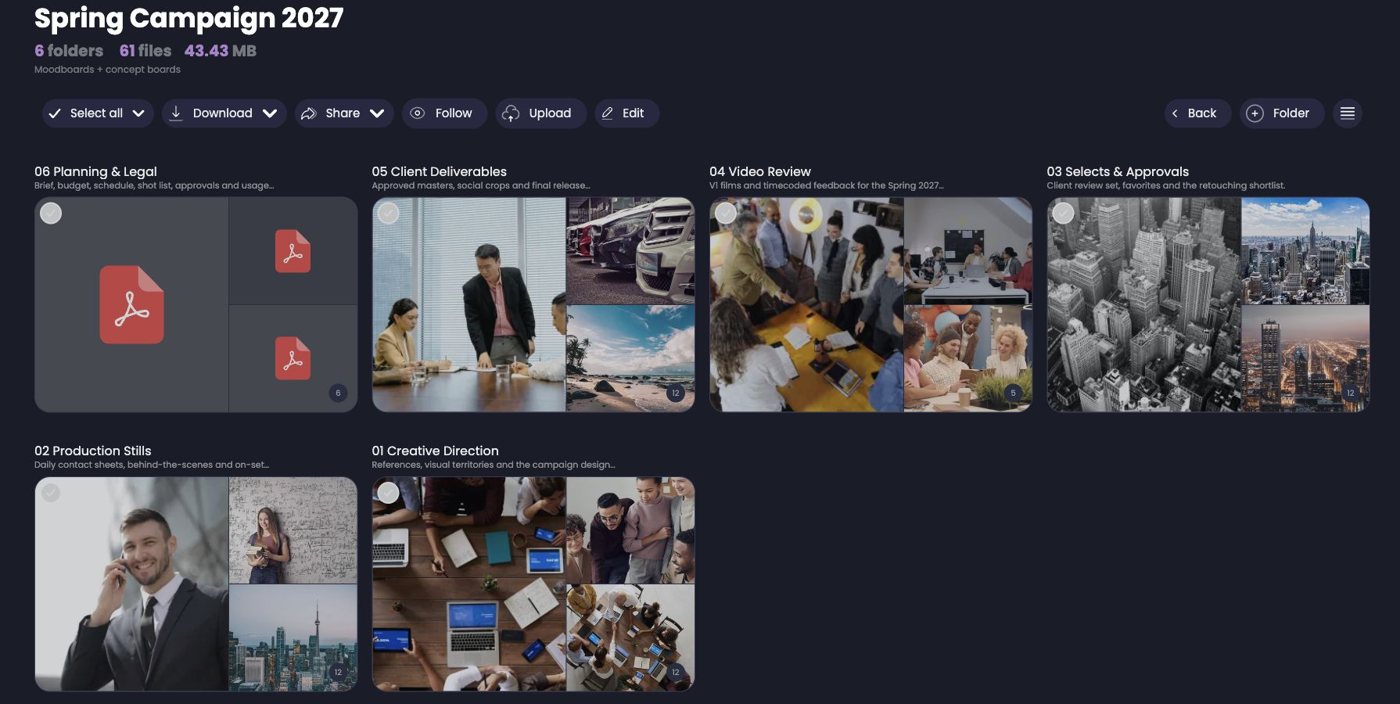
A campaign folder in Nivlo with subfolders for creative direction, production, video review and deliverables
Discuss

Feedback lives next to the file, not in an email thread.

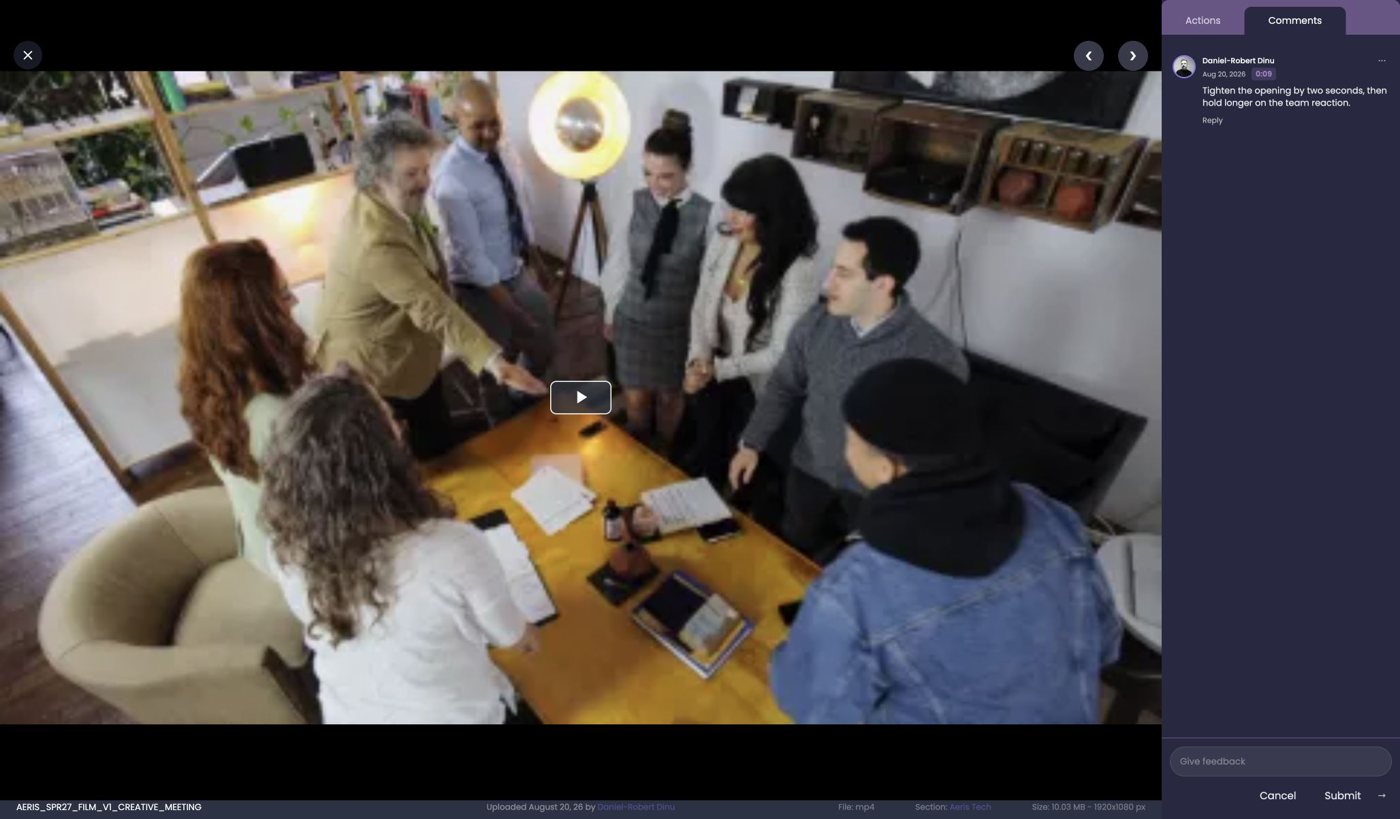
Open the asset in the browser, leave a comment and mention whoever needs to reply. On video, the comment shows the exact second.

  • Previews for more than 50 formats. RAW, PSD and PSB images, video, PDF, audio, SRT subtitles, no download needed.
  • Comments on any file, with @mentions. Your colleague gets a notification and lands right on the file.
  • Timecoded video feedback. “Cut the first two seconds” is tied to the exact moment in the clip.
  • Versions. Upload the new version on top of the old one and keep the history.
  • Follow a folder. Know when new files arrive. The Timeline shows what changed since your last visit.Pro+
AutomaticNivlo creates video proxies, so a 5 GB clip starts instantly in the browser.
Video preview in Nivlo with a comment tied to a moment in the clip
Prepare

From original to post, without Photoshop.

The social media team takes the photo straight from Nivlo, frames it for the right network and downloads it ready to publish.

  • Crop to social media formats. Instagram portrait 1080×1350, square, story or custom sizes.
  • Resize, rotate and export. Choose the format and quality before downloading.
  • Web versions. Lightweight images for the website and press, generated from the originals.
  • Your logo on downloaded imagesBusiness so assets always leave with your brand.
AutomaticSocial media formats can be generated automatically for new files.Pro+
Deliver

A link you control even after you've sent it.

The client, the press or the sponsor get a link. You can change what's behind it, switch it off and see whether it was opened.

  • Share a folder, a file or a selection. The recipient doesn't need an account.
  • Three modes. View only, original download or web version only.
  • Expiry and download control. The press link closes itself after the event.
  • PasswordPro+ and access for one email domain onlyBusiness for example, only addresses ending in @client.com.
  • ZIP archives that keep your folders. The download mirrors the structure in Nivlo.
AutomaticAdd new files to the shared folder and the link you already sent updates itself.
Automate

Ask an AI agent to find your files.

Nivlo connects to Claude and other compatible agents through MCP. The agent only sees the sections and files you give it access to.

  • External agents via MCPPro+ list and search the files in your account, with authentication.
  • AI assistant in Nivloin testing ask questions about your files right in the platform.
  • AI auto-taggingPro+ every new image gets descriptive tags.
  • API RESTPro+ connect Nivlo to the tools you already use.
In developmentSemantic search and actions you approve: move, tag, share. No dates promised.
For event organisers

A festival, from the first file to the press.

Live events need speed most: files come from several photographers and go out to the press and sponsors on the same day.

COMING INWORKING IN NIVLOGOING OUTPDFPDFPhotographerRAW + JPGVideographer4K clipsAgencyposters, PDFUpload linkno account · tags applied automaticallyNivloSummer Fest 2026Day 1 › Main stageautomatic preview and video proxySocial media teamcomments · versions · 1080×1350 cropApproved selectionready to deliverunlimited users · data in the EUShare linkweb version · expires in 7 daysPressno accountShare linkoriginal · with passwordClientno accountShare link@sponsor.com only · with logoSponsorno accountCOMING INPDFPhotographerVideographerAgencyUpload linkno account · automatic tagsNivloSummer Fest 2026Day 1 › Main stageautomatic preview and proxySocial media teamcomments · versions · cropApproved selectionready to deliverShare linkweb · 7 daysPressno accountShare linkwith passwordClientno accountShare link@sponsor.comSponsorno account
Same files, three recipients, three links with different rules. Nobody outside needs an account.
  1. Photographer

    Gets an upload link

    The link leads to “Day 1 › Main stage” and applies the event tags.

  2. Nivlo

    Prepares the files

    RAW files and clips get previews and proxies, ready to view in the browser.

  3. Social team

    Picks and comments

    Picks the selection, asks for a new version, crops to 1080×1350.

  4. Press

    Gets the web version

    A link that expires in 7 days, no account, only the approved selection.

  5. Sponsor

    Sees only what's theirs

    A separate link from the sponsor folder, with the festival logo on the images.

Real recording from Nivlo

Thousands of photos after every festival day, organised before the press asks for them.

Create the day's folder, upload everything the photographers sent and tag the whole batch in one step. The “Last upload” filter shows only the new files, even when the folder already holds hundreds of assets.

Why Nivlo

Built for the way companies work with other companies.

Files move from suppliers to agencies, then to brands and the press. Nivlo is made for that journey.

Pay for storage, not for people.

Unlimited users on every plan. Invite colleagues, suppliers and clients with no per-seat cost.

One account, several companies.

Agencies and suppliers work in several clients' workspaces from the same account, each with its own access.

One file, many places.

The same asset appears in several folders and sections. Update it once and it's current everywhere.

Your data stays in Europe.

Servers in Germany and Finland, GDPR and a DPA available. No copies outside the EU.

Pricing

Unlimited users. You only choose the space and the features.

Every paid plan starts with 30 free days, with all features, no card.

Free

€0
  • 30 GB
  • Receive, organise, feedback and deliver
  • No AI, API or MCP

Starter

€50 /month
  • 500 GB
  • 10 GB upload / session
  • Comments and video feedback

Professional

€150 /month
  • 2 TB · 50 GB / session
  • Sections, Timeline, link passwords
  • AI tagging, MCP, API

Business

€350 /month
  • 10 TB
  • Email domain, branding
  • Logo on images, priority support

Enterprise

On request
  • Dedicated configuration
  • Self-hosted, SLA
  • Integrations and onboarding

Monthly billing. 20% off with annual payment. See what each plan includes →

Questions, clearly answered.

What is Nivlo?

A platform where companies receive, organise, discuss, prepare and deliver files together with their suppliers, agencies and clients. It works in the browser and on iOS and Android.

Do suppliers and clients need an account?

They don't have to, but it's the most efficient way to work. Add them to your account with controlled permissions on sections, so each of them sees only what they need (sections are available from the Professional plan). Users are unlimited, at no extra cost. For minimal effort, send them an upload link and they upload without an account, while clients and the press can receive files through a share link.

What's the difference between an upload link and a share link?

An upload link brings files into Nivlo, straight into a folder you choose. A share link sends files out, with the access options you pick: expiry, downloads, password or email domain.

Which file types does it accept?

Any file can be stored and delivered. More than 50 formats have in-browser preview, including RAW, PSD, PSB, video (including LRV and INSV), PDF, audio, Markdown and SRT subtitles.

Where is the data stored?

On dedicated servers in Germany and Finland. Data never leaves the European Union, and a DPA is available for every client.

Can I connect Nivlo to Claude or another AI agent?

Yes, from the Professional plan, through MCP. The agent can list and search files in the sections you give it access to. Write actions are in development.

Is there a free plan?

Yes. The Free plan has 30 GB and the whole manual workflow, with unlimited users. Paid plans also come with a 30-day trial with every feature.

Show us how files move at your company.

We'll show you Nivlo on your team's workflow: where files come from, who checks them and where they go.